
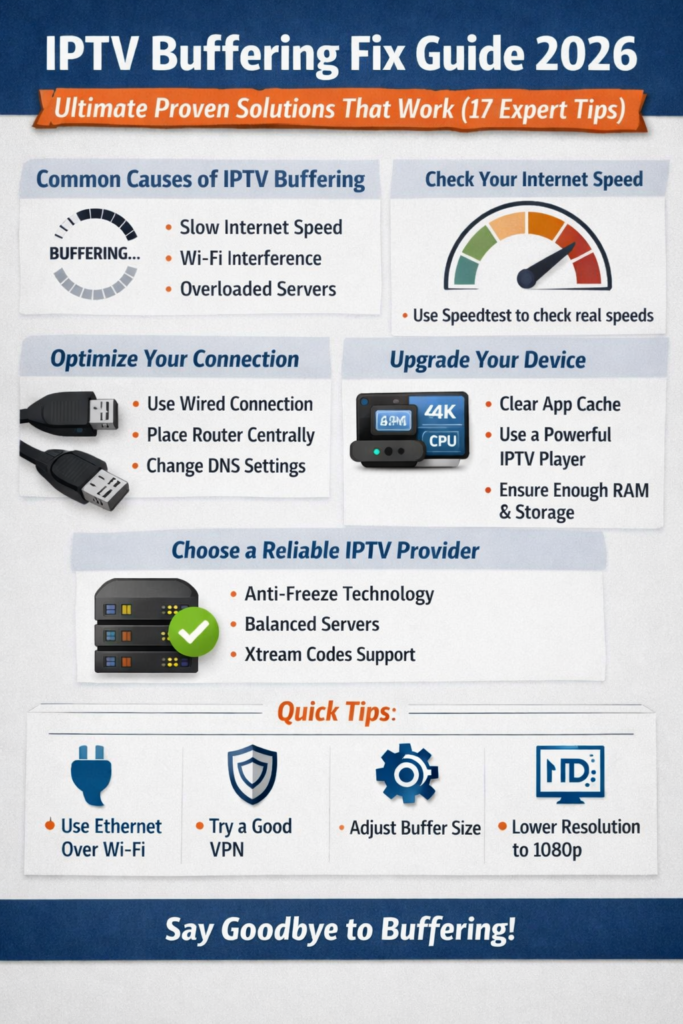
IPTV buffering fix guide 2026 reveals 17 proven, expert-backed solutions to stop IPTV buffering, freezing, and lag for smooth, uninterrupted streaming.
Understanding IPTV Buffering in 2026
What Is IPTV Buffering?
IPTV buffering occurs when your stream pauses to load more data before continuing playback. In simple terms, your device isn’t receiving video data fast enough to keep the stream running smoothly. In 2026, with higher resolutions like 4K and even experimental 8K streams, buffering has become more noticeable.
An effective IPTV buffering fix starts with understanding that buffering isn’t always your fault. Sometimes, it’s the app, the provider, or even the server load during peak hours.
Why IPTV Buffering Happens More in 2026
Streaming demands have skyrocketed. More users, higher video quality, and multi-device households put pressure on networks. Even strong connections can struggle if not optimized properly. That’s why an updated IPTV buffering fix guide 2026 is essential.
How Internet Speed Affects IPTV
Internet speed is the foundation of any IPTV buffering fix. Here’s a simple breakdown:
| Stream Quality | Minimum Speed |
|---|---|
| SD | 5 Mbps |
| HD | 10 Mbps |
| Full HD | 20 Mbps |
| 4K | 35–50 Mbps |
If your speed dips below these levels, buffering is almost guaranteed.
Internet & Network-Level IPTV Buffering Fixes
Check Your Real Internet Speed
Don’t rely on what your ISP advertises. Use reliable tools like Speedtest or Fast.com. Test during peak hours because that’s when IPTV buffering usually hits hardest.
A real-world IPTV buffering fix starts by confirming your actual download speed, ping, and jitter.
Use Wired Connections Over Wi-Fi
Wi-Fi is convenient, but Ethernet is king. A wired connection reduces packet loss and interference. If you’re serious about an IPTV buffering fix in 2026, Ethernet is one of the easiest wins.
Router Placement & Optimization
Router placement matters more than people think. Keep it:
- Central in your home
- Away from walls and metal objects
- Updated with the latest firmware
Outdated firmware can quietly sabotage your IPTV buffering fix efforts.
DNS Settings That Reduce Buffering
Changing DNS can significantly improve stream stability.
Public vs ISP DNS
Popular public DNS options:
- Google DNS: 8.8.8.8 / 8.8.4.4
- Cloudflare: 1.1.1.1 / 1.0.0.1
These often resolve IPTV streams faster than default ISP DNS, making them a subtle but powerful IPTV buffering fix.
Device & App Optimization for IPTV
Clear Cache on IPTV Apps
Cache buildup causes lag and freezes. Clearing cache weekly helps maintain smooth playback. This simple IPTV buffering fix is often overlooked.
Best IPTV Players in 2026
Not all players are created equal. Reliable options include:
- TiviMate
- IPTV Smarters Pro
- Perfect Player
A high-quality app is a core part of any long-term IPTV buffering fix strategy.
Device Hardware Limitations
RAM, CPU, and Storage Explained
Low-end devices struggle with modern codecs. For buffer-free IPTV in 2026, your device should have:
- At least 2GB RAM
- Quad-core CPU
- Adequate free storage
If your hardware is outdated, no IPTV buffering fix will work consistently.
IPTV Provider & Server Optimization
Server Load & Peak Hours
Even premium providers experience overload during major sports events. A reliable IPTV buffering fix includes choosing providers with load-balanced servers.
Importance of Anti-Freeze Technology
Anti-freeze systems pre-load extra data to prevent buffering. Providers offering this feature are far ahead in 2026.
M3U vs Xtream Codes
Xtream Codes generally offer better stability and faster channel switching. Switching formats can be an instant IPTV buffering fix.
For deeper technical streaming standards, you can reference industry resources like the FCC broadband guidelines:
https://www.fcc.gov/general/broadband-speed-guide
Advanced IPTV Buffering Fix Techniques
VPNs: Help or Harm?
VPNs can either fix or worsen buffering. A premium VPN may bypass ISP throttling, but a slow VPN server will cause more harm than good. Test both scenarios to find your ideal IPTV buffering fix.
Adjusting Buffer Size
Many IPTV players allow manual buffer size settings. Increasing buffer size helps on unstable connections, while lower buffer works best on fast, stable networks.
Video Codec & Resolution Settings
Lowering resolution from 4K to Full HD can instantly resolve buffering. HEVC (H.265) codecs are more efficient and should be enabled whenever possible.
Frequently Asked Questions (FAQs)
❓ What is the fastest IPTV buffering fix in 2026?
Using Ethernet instead of Wi-Fi is the quickest and most reliable fix.
❓ Can internet speed alone stop IPTV buffering?
No. Speed helps, but device performance, app quality, and provider servers also matter.
❓ Do free IPTV services buffer more?
Yes. Free services often lack proper server infrastructure.
❓ Is a VPN required for IPTV buffering fix?
Not always. It helps only if your ISP throttles IPTV traffic.
❓ How often should I clear IPTV app cache?
Once a week is ideal for smooth performance.
❓ Does router quality affect IPTV buffering?
Absolutely. Modern routers handle streaming traffic far better.
Conclusion
The IPTV buffering fix guide 2026 proves that buffering isn’t a mystery—it’s a solvable problem. By optimizing your internet, upgrading devices, choosing reliable apps, and working with quality providers, you can enjoy seamless IPTV streaming. Stay proactive, test regularly, and don’t settle for constant buffering when smooth streaming is completely achievable.